This time I'll try for a little tutorial about analyzing the log message. Files can be downloaded here The first step is to look at the contents and permissions of the file and extract
The next article , I 'll try to give a little tutorial how to analyze . certainly still part of the digital forensic . Download the file here The first step is the analysis organization Analysis organization root@bt:~# dd if=practical.floppy.dd of=/dev/fd0 then output is create a folder
still keep the spirit I will try to demonstrate how to carve a data, you can download the file here ( to learn ) If the file is opened, an error occurs such as
we often hear the word unallocated space . for that I will discuss this time . Unallocated space is the available disk space and are not allocated to any volume . Type of volume you can create on the unallocated space depends on the type of disk . On a basic disk , you can use the unallocated space to
I 'll try to explain how a structure file extension .EXE. EXE is a common file extension indicates an executable file ( program) in the DOS , OpenVMS , Microsoft Windows , Symbian , and others. In addition to the executable program , many EXE files contain other components called resources, such as bitmaps and icons which the executable program to be able
One way to include metadata , often associated with Unix and its derivatives , is just to keep the "magic number " in the file itself . Basically the term is used for a particular set of 2- byte identifier at the beginning of the file , each sequence can be regarded as undecoded binary numbers, for it is a feature of a unique file format distinguishes it could be used for identification .
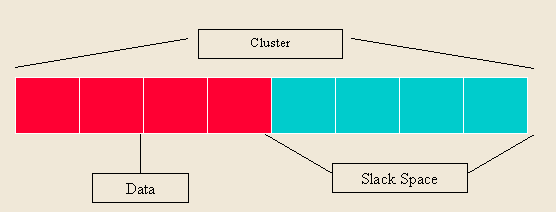
Slack space is a form of internal fragmentation , which is wasted space on your hard disk . When a file is written to disk it is stored in the " beginning" of the cluster . A cluster is defined as a set of logically contiguous sectors and the smallest amount of disk space that can be allocated to store the file . Rarely equal or match between the available space in the cluster and the number of bytes in the file . The remaining bytes in the cluster is not used , then the name of the slack space .
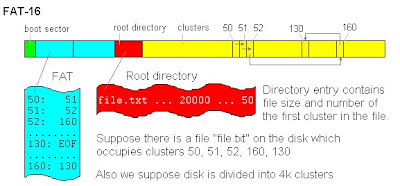
For this time I will explain about a system file structure there are some that I will explain , among others, are : FAT16 FAT32 NTFS EXT2 EXT3 starting from the first , which is FAT16 FAT16 we start from the first FAT . What is FAT ? FAT File System that is used in Windows Operating System . FAT 's name comes from the use of tables that focus on areas where information is empty or may not be used . To limit the size of the table , the disk space allocated to files in hardware sector groups are adjacent , so-called developing cluster. When disk drive , the maximum number of clusters also
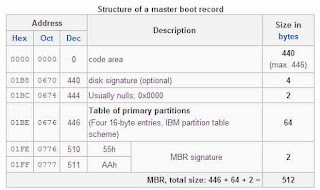
I 'll try to explain about Master Boot Record. What is a Master Boot Record? Master Boot Record ( MBR ) is a type of boot sector is located on a Computer. It consists of a sequence of 512 bytes are located in the first sector of data storage devices like hard disks . MBR is usually placed on a storage device designed for use with IBM PC compatible with the system.